Accounting & Banking
Move money between your own accounts (Contra voucher)
Business and above · 1 min read · Updated 16 October 2026
What this does
A Contra voucher moves money between two of your own bank or cash accounts, for example from the cash drawer to the bank. It is not income and not an expense, so it does not change your profit.
Before you start
- Create the accounts first. See Bank and cash accounts. A cash account called Cash in Hand already exists.
- The two accounts must be different.
Steps
- Open Finance, then Voucher, and click Contra.
- Choose the From account (1), where the money is now.
- Choose the To account (2), where the money goes. The list shows the Balance of each account.
- Type the Amount (3). Check the Voucher date.
- Add a Narration, for example Cash for the office drawer.
- Click Post Transfer (4).
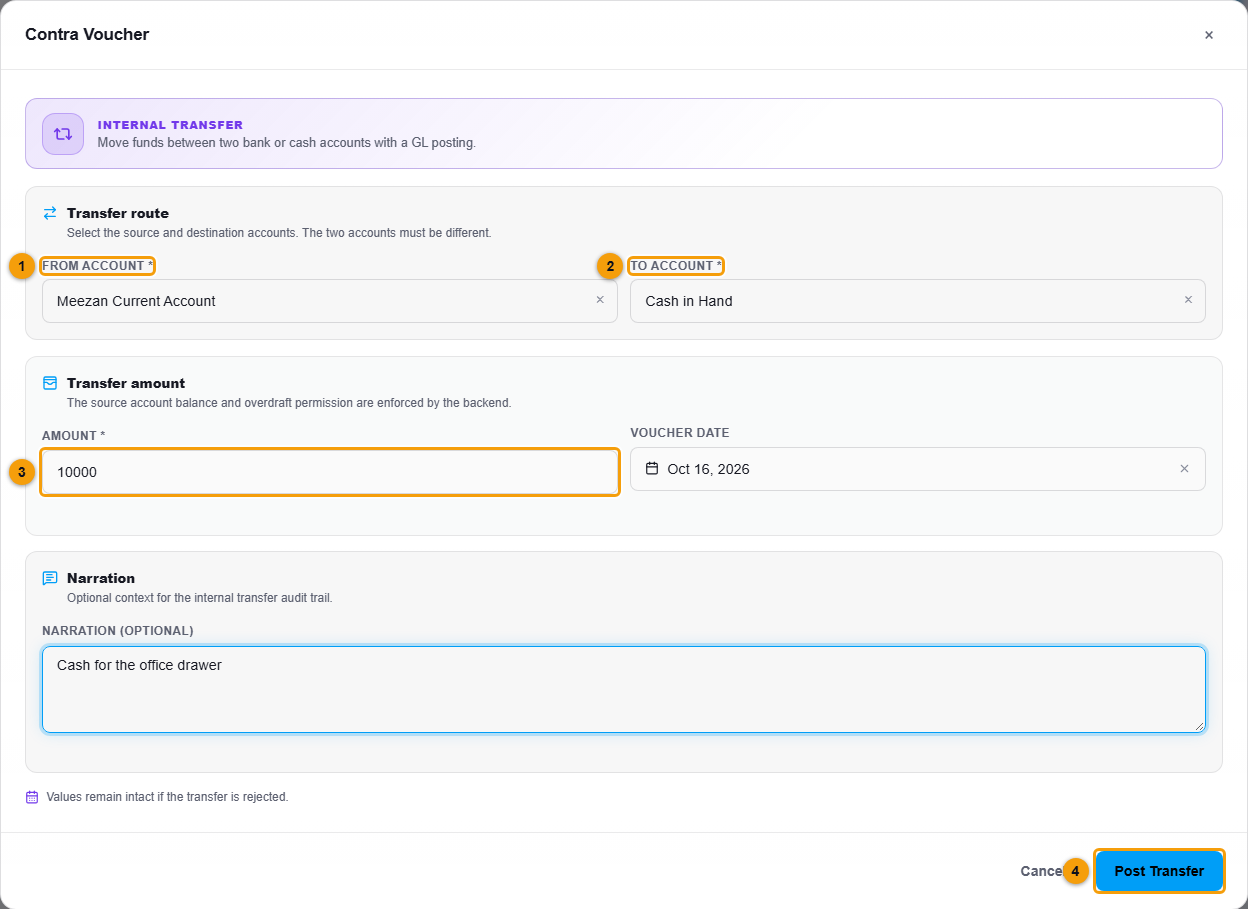
From account (1), to account (2), amount (3) and Post Transfer (4).
What happens next
The voucher is posted with a number such as CV-000002. The amount leaves the first account and arrives in the second. Both movements appear in the Ledger reports and in the Bank ledger.
Important notes
- If the From account does not hold enough, NEXTOREx shows a warning. The transfer is blocked unless your role allows an overdraft.
- Posted vouchers cannot be edited. To undo a transfer, reverse the voucher.