Accounting & Banking
Cheques
Business and above · 1 min read · Updated 16 October 2026
What this does
A cheque does not move money until the bank clears it. NEXTOREx lets you record the cheque as Pending and apply the money only when it clears. If the bank returns it, you mark it as bounced.
Before you start
- Add the bank account the cheque belongs to.
Record a cheque
- Open Finance, then Cheque.
- Click Add Cheque.
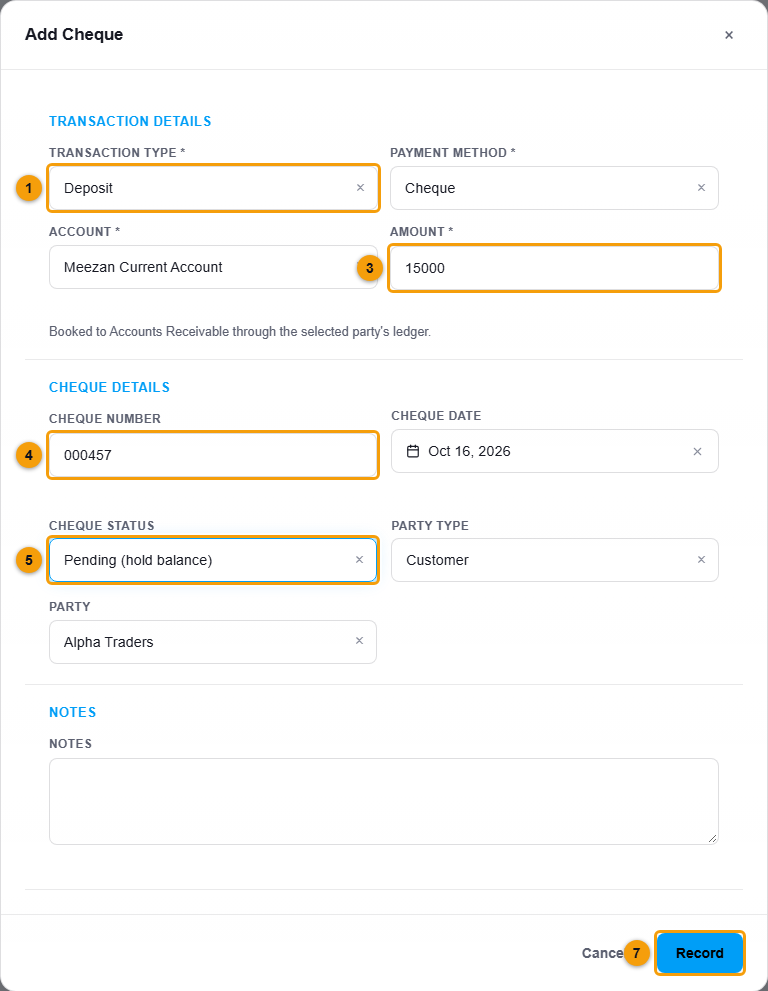
Type, account, amount, cheque number and status.
- Choose Transaction type: Deposit for a cheque you received, Withdrawal for one you issued. The payment method is set to Cheque.
- Choose the Account and enter the Amount.
- Choose the other account in Received from (account) or Paid to (account). For a cheque from a customer for an invoice, choose Accounts Receivable.
- Enter the Cheque number and Cheque date.
- Choose the Cheque status: Pending (hold balance) if the cheque has not cleared yet, or Cleared (apply now).
- Choose the Party type and Party. NEXTOREx will not save the cheque without them.
- Click Record.
Clear or bounce a cheque
- In the Cheque list, right-click the cheque.
- Choose Clear cheque when the bank has cleared it. Confirm the message. The money is then applied to the account balance.
- Choose Mark as bounced if the bank returned it.
The Due & Overdue tab is for cheques that are waiting to clear.
Important notes
- A pending cheque is held back from the balance until you clear it.