Accounting & Banking
Chart of Accounts
Starter and above (adding accounts needs Business and above) · 1 min read · Updated 16 October 2026
What this does
The Chart of Accounts is the list of accounts where NEXTOREx records money: cash, bank, what customers owe you, what you owe suppliers, sales, costs and more. NEXTOREx uses double-entry accounting, so every sale, purchase and payment is recorded in two accounts for you. A starting set of accounts is created with your business.
Steps
To look at your accounts:
- Open Finance, then Chart of Accounts.
- Read the list. Each account has a Code, Account name, Account type, Normal balance, and whether it can be posted to.
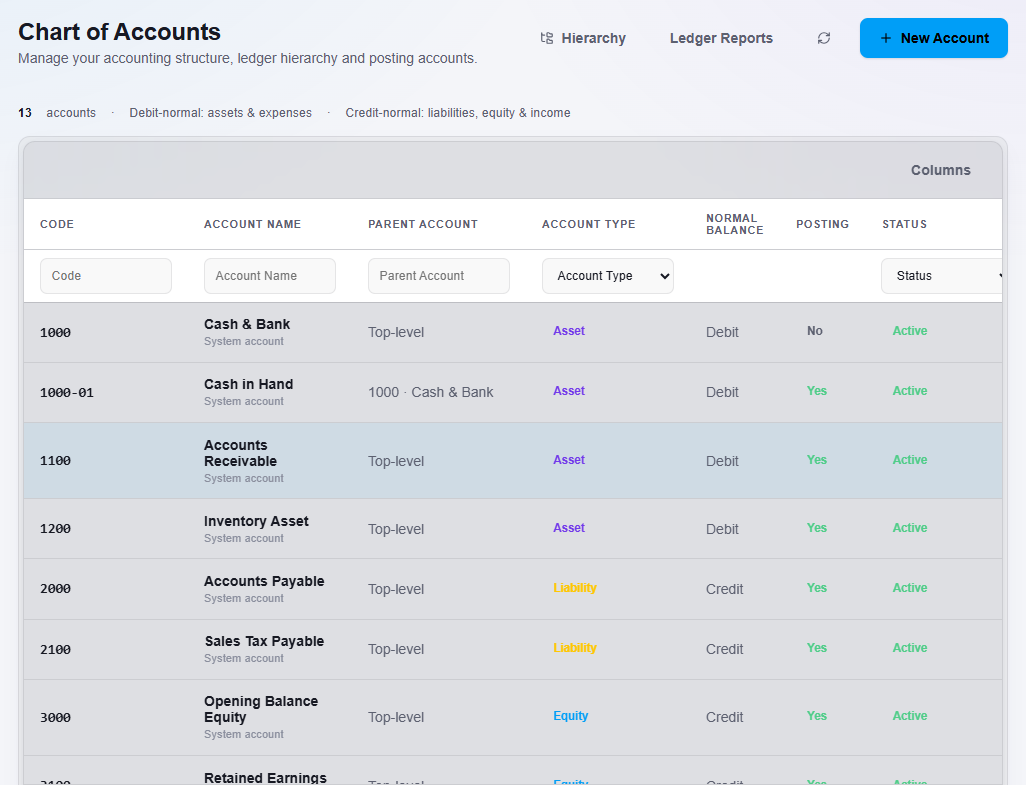
To add an account:
- Click New Account.
- Enter a Code and the Account name.
- Choose the Account category. Optionally choose a Parent account to place it under another account.
- Leave Active account switched on.
- Click Save Account.
What happens next
The new account appears in the list and can be chosen when you post vouchers and bank transactions.
Important notes
- You do not need to make accounts for normal sales, purchases and stock. NEXTOREx posts those to the right accounts for you.
- Ask your accountant before adding accounts.