Demo & Trial
Your Trial
Plans with a Trial · 1 min read · Updated 16 October 2026
What this does
A Trial lets you use a plan before you pay. While it is running, no payment is taken. When you are ready, you activate the plan to keep using it.
Steps
To check your Trial:
- Open Billing, then Subscriptions, then Subscription & Plans.
- Open the My Plan tab.
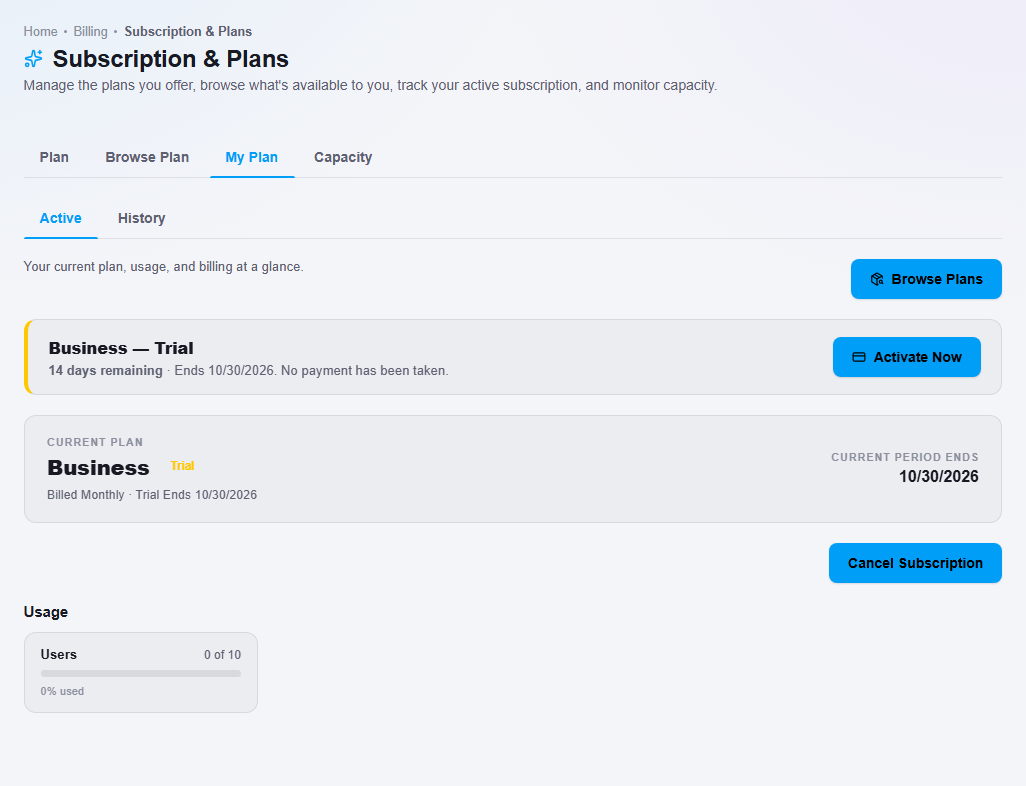
- Read the banner at the top. It shows the plan and trial, for example Business — Trial, how many days remaining there are, the date it ends, and the note No payment has been taken.
To activate your plan:
- Click Activate Now. NEXTOREx takes you to Browse Plan. Every plan card shows Activate this plan.
- Click Activate this plan on the plan you want to keep, and follow the steps on screen. See Browse plans and change your plan.
What happens next
- If you activate before the Trial ends, you keep using the plan.
- If the Trial ends and you have not activated, access is paused and you see a message that your trial has ended. Your data is kept.
- A business can have one Trial.
- A Trial moves to a paid plan only when you activate it. Until then no payment is taken.
Important notes
- Your Trial is a real plan, so the same limits apply, for example the number of users.