Demo & Trial
Turn on a Trial for a plan (platform owner)
Platform owner only · 1 min read · Updated 16 October 2026
What this does
This guide is for the NEXTOREx platform owner. It switches a Trial on for a plan by giving it a number of trial days. With 0 days, the plan has no Trial.
Steps
- Sign in as the platform owner.
- Open Billing, then Plans.
- Scroll to the box Commercial plan trials. It has one box for each plan: CRM Basic, Starter, Business, Pro and Agency.
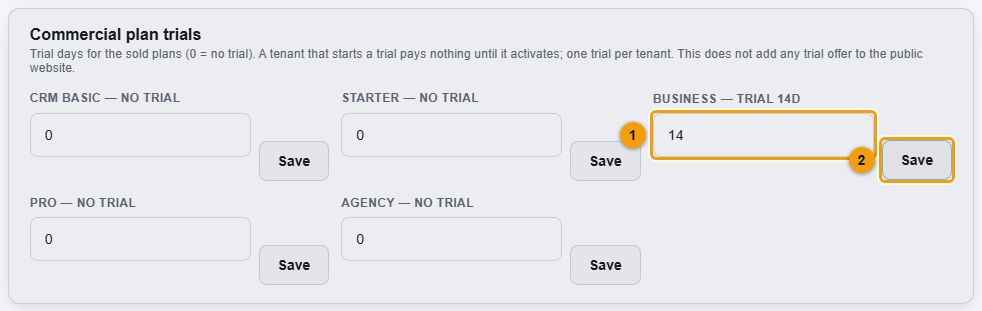
Trial days for the Business plan (1) and Save (2).
- Type the number of days in the plan's box (1). Use 0 for no trial.
- Click Save (2) next to it.
What happens next
The label above the box changes, for example from BUSINESS: NO TRIAL to BUSINESS: TRIAL 14D, and a confirmation says the trial was set.
A business that starts a Trial on this plan pays nothing until it activates. Each business can have only one trial.
Important notes
- This does not add a Trial offer to the public website.