Reseller & Multi-Tenant
Manage a client business
Agency · 1 min read · Updated 16 October 2026
What this does
Each client business has a page where you can see and manage it.
Steps
- Open User Management, then Tenants.
- Double-click a client business to open it.
At the top you can see the contact, whether the client is Active, and buttons: Edit, View Hierarchy, Assign Hierarchy, Deactivate and Delete.
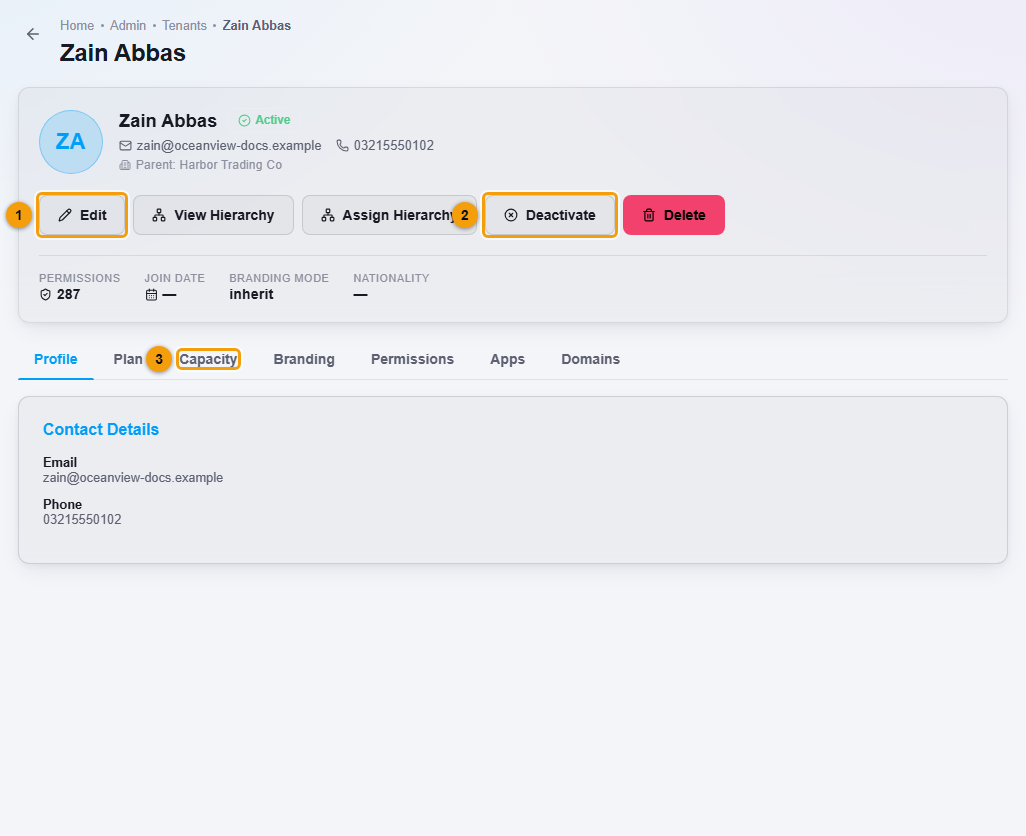
Use the tabs:
- Profile: contact details.
- Plan: the client's plan. See Choose a plan for a client.
- Capacity: the client's limits, such as Users, Custom Domains and Sub-Tenants, with how much is used and what remains. Increase and Decrease buttons let you share more of your own spare capacity with the client.
- Branding, Permissions, Apps and Domains: branding, access and domain settings for the client.
What happens next
Changes to capacity apply straight away.
Important notes
- Capacity you give to a client comes from your own plan. You cannot give more than you have.
- Deactivate switches the client off. Delete permanently deletes the client business and everything in it.