Billing & Plans
Cancel or keep your subscription
All paid plans · 1 min read · Updated 16 October 2026
What this does
You can stop your plan from renewing. Your plan stays active until the end of the period you have already paid for. Until that date you can change your mind.
Steps
To cancel:
- Open Billing, then Subscriptions, then Subscription & Plans.
- Open the My Plan tab.
- Click Cancel Subscription.
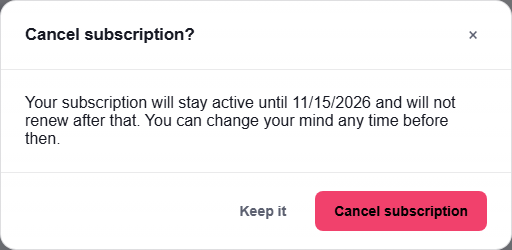
The message tells you the date your access continues until.
- Read the message. It says your subscription stays active until the date shown and does not renew after that.
- Click Cancel subscription to confirm, or Keep it to go back.
To keep your subscription after cancelling:
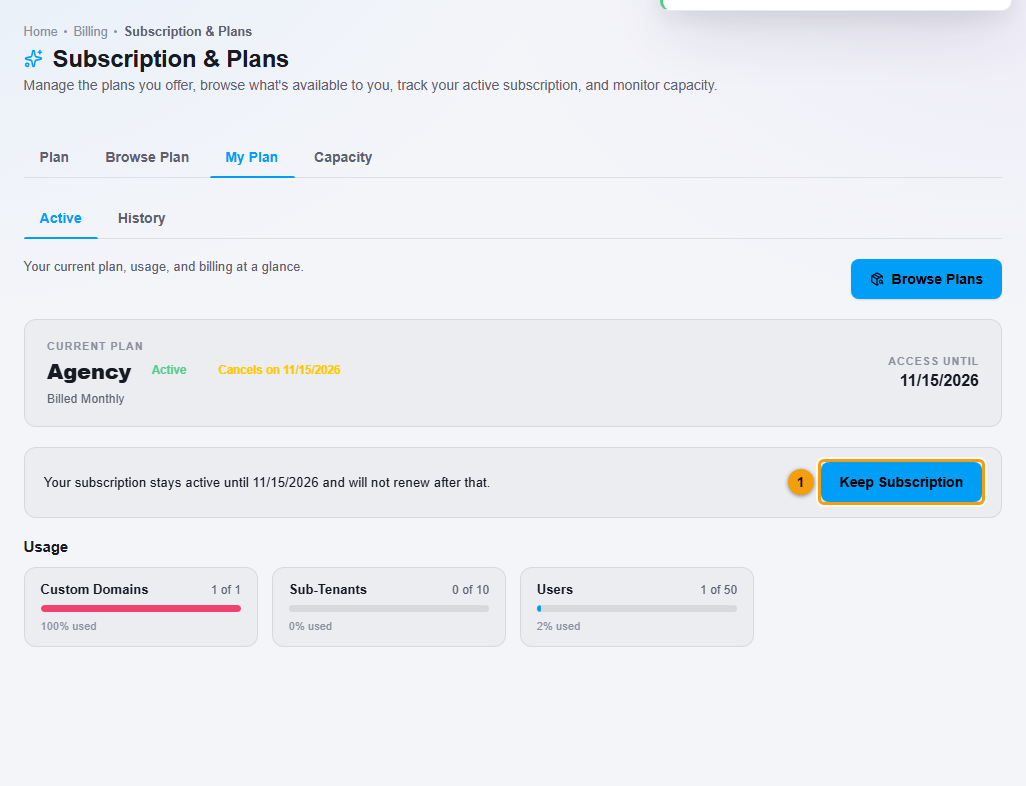
- Open the My Plan tab again. The plan now shows Cancels on and the date.
- Click Keep Subscription.
What happens next
- After you cancel, you keep full access until the date under Access until. The plan will not renew after that.
- After you click Keep Subscription, the plan continues and renews as normal.
Important notes
- Read the Refund and Cancellation Policy for what happens to payments you have already made.