White Label
Connect your own domain
Agency (1 custom domain) · 2 min read · Updated 16 October 2026
What this does
You can use your own web address, for example shop.yourcompany.com, for your workspace. NEXTOREx first checks that you really own the address. This is called ownership verification.
Before you start
- You need an Agency plan. It includes one custom domain.
- You need access to the place where your domain's DNS records are managed. This is your registrar or DNS provider, for example GoDaddy, Namecheap, Hostinger, Cloudflare or Bluehost.
Steps
- Open Theme Studio, then Domains. The page is called Connect a Custom Domain and shows five steps: Domain, Registrar, Status, Test and DNS Setup.
- Enter Your domain (1) and click Next (2).
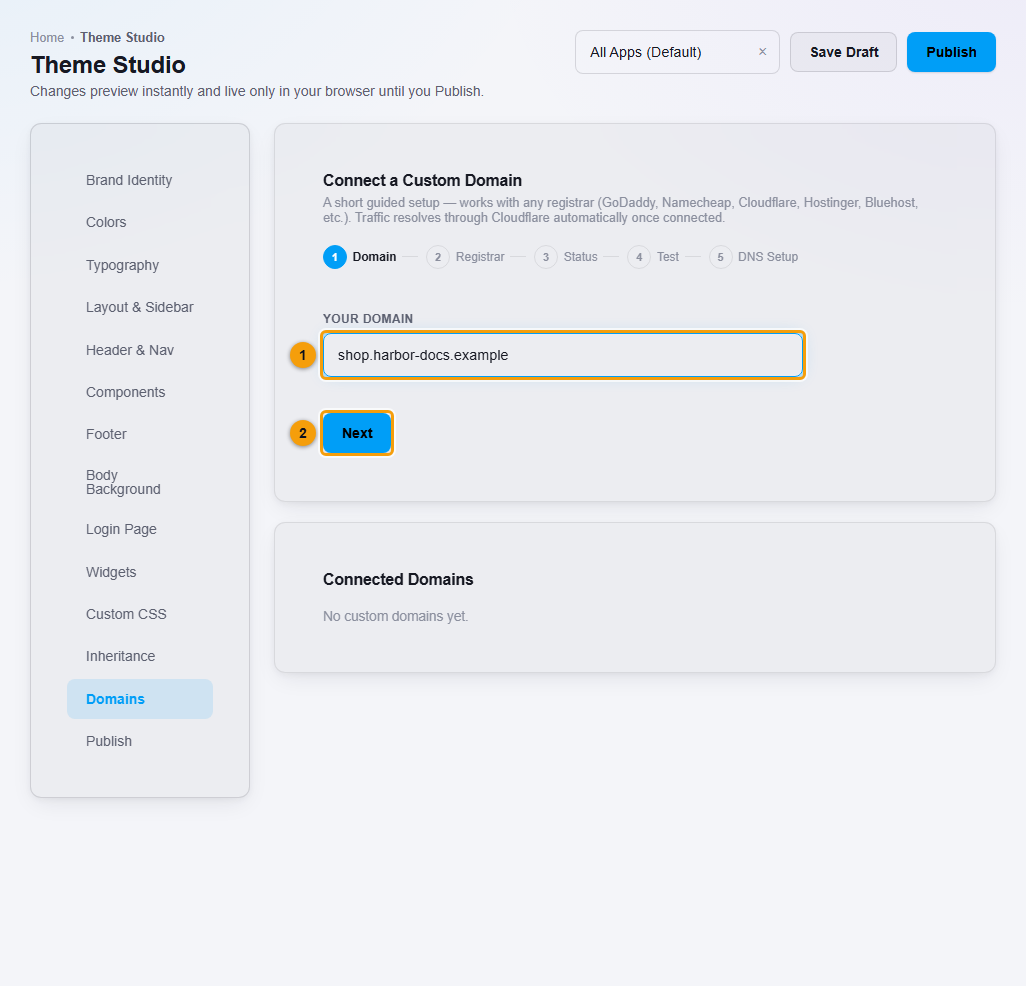
Enter the domain you own.
- Choose where the domain is registered, or Other / I'll do it myself. This only tailors the instructions. Click Connect.
- The domain is added under Connected Domains and shows Verify ownership.
- Click Setup Guide. It shows two DNS records to add at your registrar or DNS provider:
- A TXT record. Its host starts with
_nextorex-challenge. Its value begins withnextorex-site-verification=. This proves you own the domain. - A CNAME record for your domain, pointing to the value shown.
Click Copy value next to each, then add them in your DNS control panel exactly as shown.
- A TXT record. Its host starts with
- When the records are saved, come back and click Verify.
What happens next
The Connected Domains list shows the state of each domain. While the TXT record is missing it says to add the ownership record and check again. A domain only goes live after ownership is verified and the CNAME is correct.
Other buttons on the domain:
- Make Primary makes it your main address.
- Remove disconnects it.
Important notes
- Copy the values from your own Setup Guide. Do not type them from memory.
- DNS changes can take time to appear. If Verify does not succeed straight away, wait and try again.
- A domain works only after you prove you own it and the records match. NEXTOREx does not promise a secure (SSL) certificate automatically for your domain, so test the address before you tell clients to use it.
- You can only connect as many domains as your plan allows. On Agency, that is one.